The debate usually starts with a practical question.
A Web3 founder or developer needs a website. They know WordPress. They’re evaluating options and they keep running into two fundamentally different approaches: classic themes with page builders, and Full Site Editing with block themes. Both claim to solve the same problem. Both have advocates who speak with conviction. The actual differences are harder to find than they should be.
This isn’t a neutral comparison designed to end with “it depends.” For Web3 startups specifically, there’s a defensible answer. Getting there requires understanding what each approach actually is, not what its advocates claim it is.
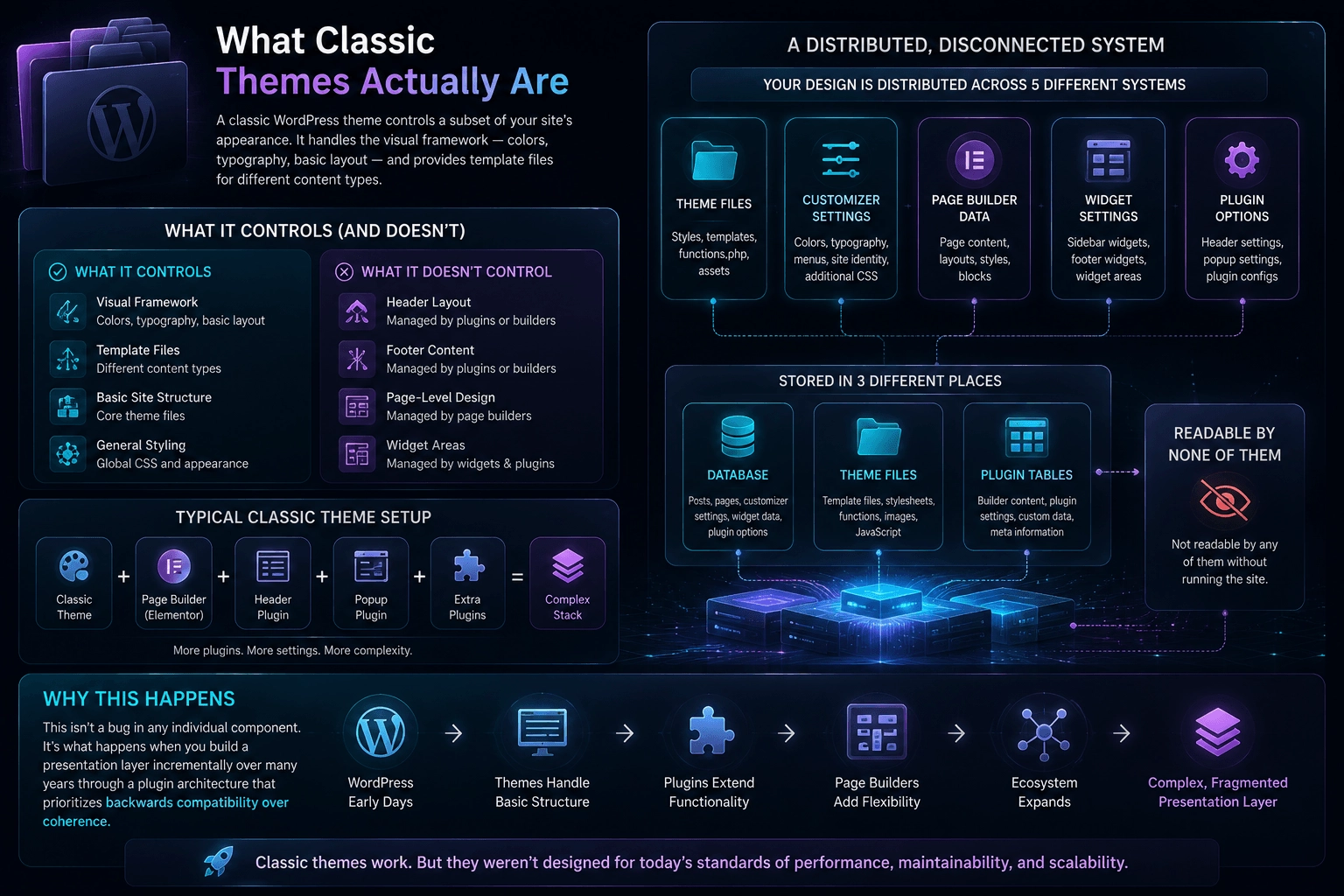
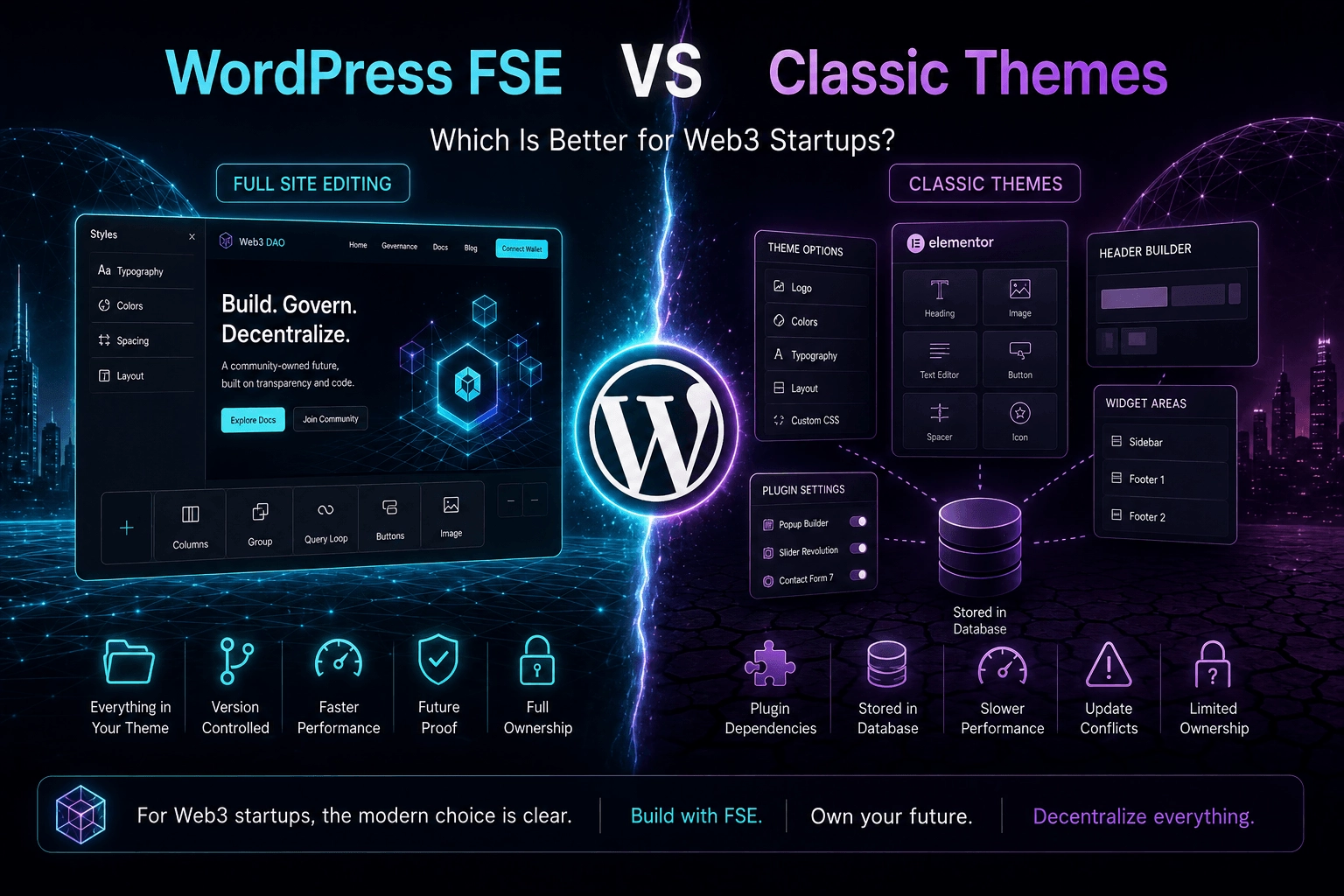
A classic WordPress theme controls a subset of your site’s appearance. It handles the visual framework — colors, typography, basic layout — and provides template files for different content types. What it doesn’t control is everything else: the header layout, the footer content, the page-level design, the widget areas.
Those elements are managed by a combination of the theme, the Customizer, widget settings, and usually one or more page builder plugins. A typical classic WordPress setup for a Web3 startup might involve a theme, a page builder like Elementor or WPBakery, a separate header plugin, a popup plugin, and a few others that accumulate over time.
The result is a site where your design is distributed across five different systems, stored in three different places — the database, the theme files, and the plugin options tables — and readable by none of them without running the site.
This isn’t a bug in any individual component. It’s what happens when you build a presentation layer incrementally over many years through a plugin architecture that prioritizes backwards compatibility over coherence.
What WordPress FSE Actually Is
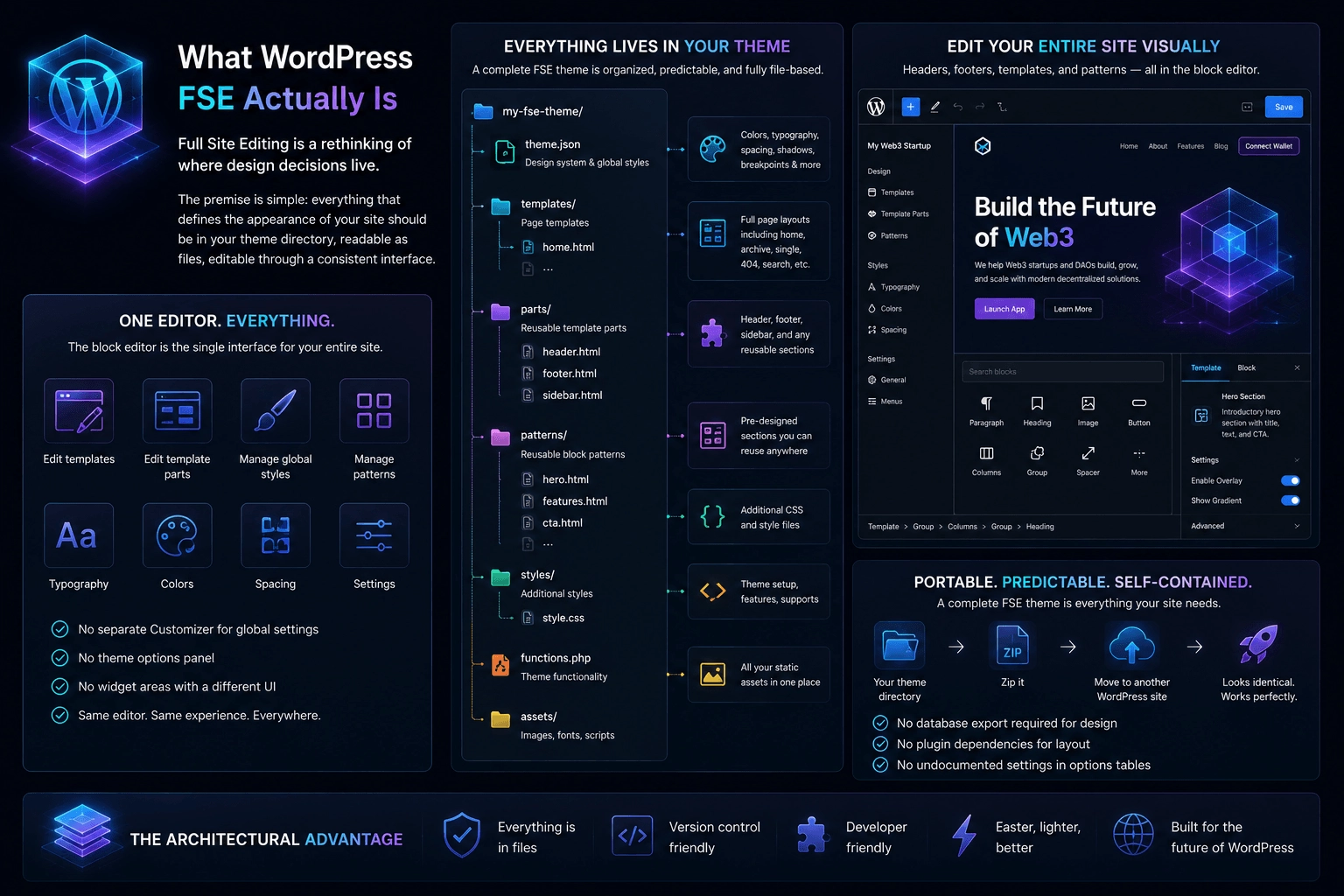
Full Site Editing is a rethinking of where design decisions live.
The premise is simple: everything that defines the appearance of your site should be in your theme directory, readable as files, editable through a consistent interface. Your header is a file in parts/header.html. Your footer is parts/footer.html. Your page templates are files in the templates/ directory. Your color palette, typography, and spacing are defined in theme.json. Your reusable section designs are patterns in the patterns/ directory.
The editor that modifies all of this is the block editor — the same interface you use to write posts and pages, extended to cover the entire site. There’s no separate Customizer for global settings, no theme options panel, no widget areas managed through a different UI than your content.
The architectural consequence is significant: a complete FSE theme is a self-contained directory. You can zip it, move it to another WordPress installation, and the site looks identical. No database export required for the design. No plugin dependencies for the layout. No undocumented settings scattered across options tables.
The Version Control Question
For a Web3 startup with any technical depth, this is often the deciding factor before anything else gets considered.
Classic themes with page builders are not version controllable in any meaningful sense. Your page layouts live in the database as serialized PHP arrays or JSON blobs mixed in with your content. You can export them in proprietary formats, but you cannot diff them, review them in a pull request, or roll back a specific change without rolling back the entire database.
FSE themes are entirely version controllable. Your design is files. Files go in Git:
git add templates/front-page.html
git commit -m "Update hero section for v2 launch"
git push origin staging
You get a complete history of every design decision. You can see exactly what changed between versions. You can run staging environments that mirror production without a database sync. You can do code review on visual changes the same way you review code changes.
For a team that already runs a disciplined engineering workflow — which most Web3 startups do, at least on the protocol side — bringing the front-end into that workflow is not a minor convenience. It’s a meaningful reduction in the operational gap between how the team manages its code and how it manages its website.
Performance: The Structural Difference
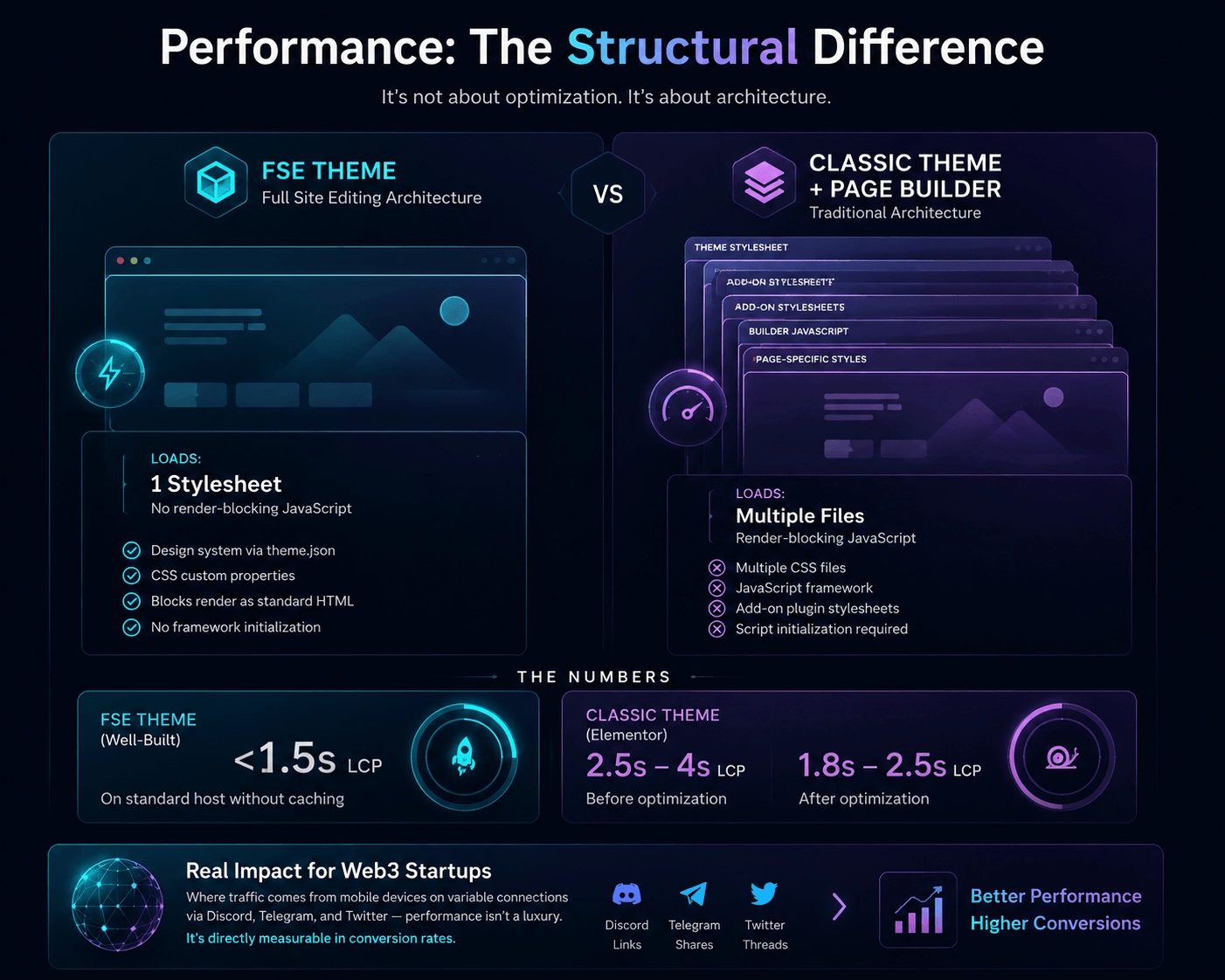
The performance gap between FSE themes and classic theme setups isn’t primarily about optimization. It’s structural.
A classic WordPress site with a page builder loads your theme’s stylesheet, the page builder’s stylesheet, the page builder’s JavaScript framework, any add-on plugin stylesheets, and then the page-specific styles generated by whatever layout you’ve built. On a typical Elementor installation, this means multiple separate CSS files and a JavaScript bundle that initializes before the page can render.
An FSE theme loads one stylesheet. The design system is compiled into CSS custom properties from theme.json at the theme level. There’s no JavaScript framework for the layout — blocks render as standard HTML. There’s no render-blocking script initialization.
The numbers are not subtle. A well-built FSE theme typically achieves a Largest Contentful Paint under 1.5 seconds on a standard host without any caching configuration. A comparable classic theme with Elementor will typically be between 2.5 and 4 seconds before optimization, and 1.8 to 2.5 seconds after.
For a Web3 startup landing page where a significant percentage of traffic arrives from mobile devices on variable connections — via Discord links, Telegram shares, and Twitter threads — this difference is directly measurable in conversion rates.
The Learning Curve Is Real, But Temporary
The most honest argument for classic themes is that the learning curve for FSE is real and front-loaded.
A developer who has spent three years building WordPress sites with Elementor knows where everything is. The widget areas, the theme options panel, the page builder interface — it’s familiar. Switching to FSE means relearning where design decisions live, understanding the template hierarchy in a new context, and building a pattern library from scratch rather than using the page builder’s template library.
This is not trivial. For a team that needs a website in two weeks for a token launch, the familiarity advantage of classic themes is a legitimate consideration.
But the learning curve is a one-time cost. Once a developer understands FSE architecture — templates, parts, patterns, theme.json — the workflow is faster than the classic theme equivalent for every project that follows. The design is predictable because it’s in files. The editor is consistent because it’s one interface. The deployment is simpler because there are no plugin dependencies to manage.
The teams that resist FSE longest are usually the ones who front-load their comparison by measuring how long the first project takes, rather than how long the fifth project takes.
Maintenance Over Time
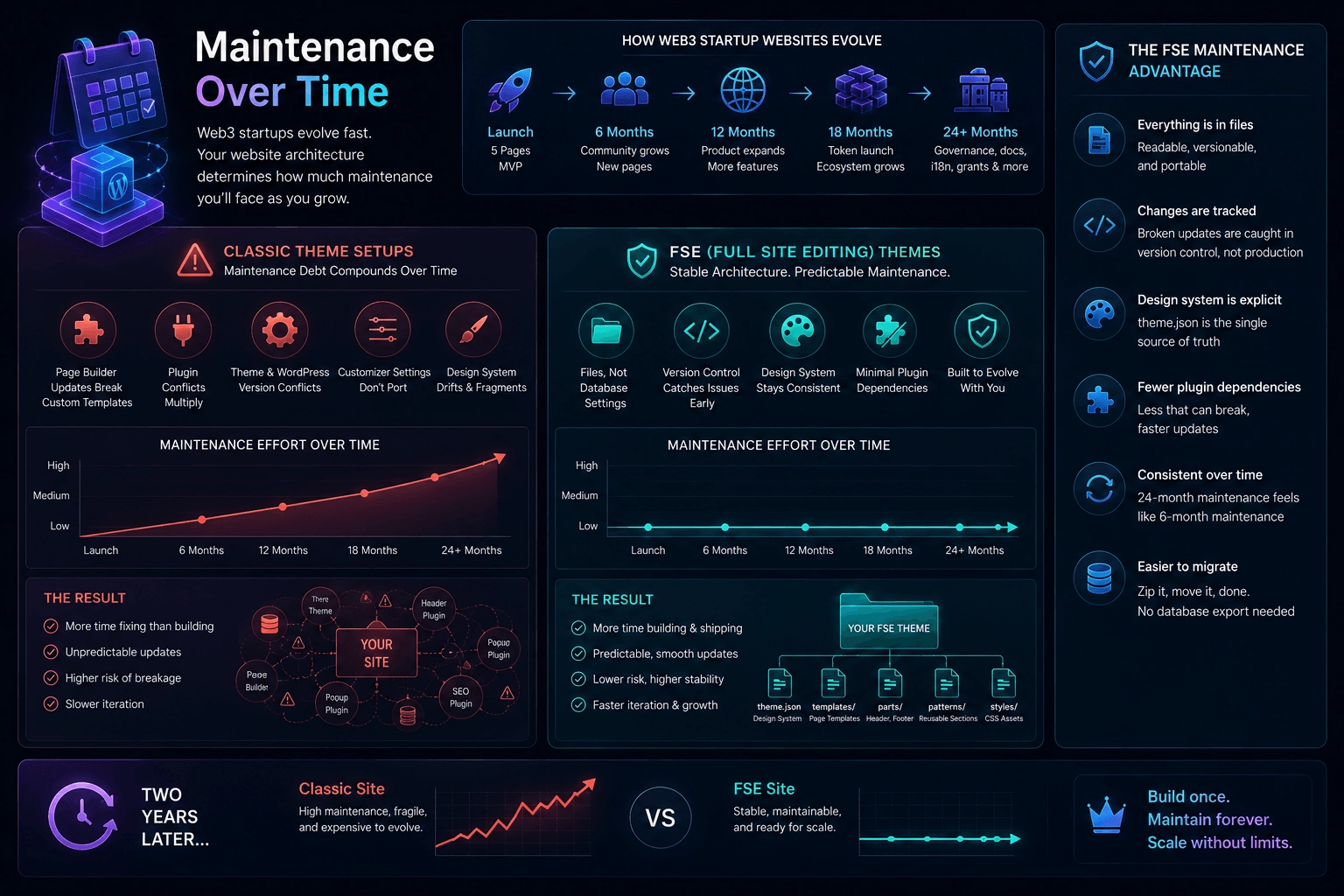
Web3 startups don’t stay the same. The website that launched with five pages needs twenty-four months later to have a governance section, documentation, a changelog, a grants page, and three language variants. The team grows. The brand evolves. The token launches and the tokenomics page needs regular updates.
Classic theme setups accumulate maintenance debt in predictable ways. The page builder updates and one of your custom templates breaks. The header plugin conflicts with the new WordPress version. The theme’s Customizer settings don’t survive a theme switch. The design system you established informally eighteen months ago has drifted — colors are inconsistent, font sizes vary by page, spacing is arbitrary.
FSE themes have different maintenance characteristics. The design system is explicit in theme.json — drift is visible because the source of truth is readable. Template changes are in files — a broken update shows up in version control before it reaches production. Plugin conflicts are reduced because the layout doesn’t depend on plugins.
The maintenance profile of an FSE site at two years looks more like the maintenance profile at six months than a classic site does. The debt doesn’t compound at the same rate because the architecture doesn’t accumulate implicit dependencies.
The Ecosystem Gap Is Closing
The strongest legitimate argument against FSE for Web3 startups a couple of years ago was the ecosystem gap. The classic theme ecosystem — themes, plugins, tutorials, third-party integrations — was vastly larger than the FSE ecosystem. If you needed a specific capability, there was almost certainly a classic theme solution and possibly no FSE solution.
That gap has closed significantly. The major WordPress plugin developers have updated their products for FSE compatibility. The tutorial ecosystem has matured. Block theme repositories have grown from a handful of experimental projects to hundreds of production-ready options. The tooling for building custom FSE themes — Create Block Theme, Block Theme Generator — has made development substantially faster.
The remaining gaps are real but narrow. Complex e-commerce setups, membership sites with intricate access control, and heavy WooCommerce customizations still have more mature classic theme solutions. For a Web3 startup website — marketing pages, documentation, blog, governance information — the FSE ecosystem covers everything you need.
What Classic Themes Still Do Better
A complete comparison requires honesty about where classic themes retain advantages.
Complex WooCommerce integrations. If your Web3 project has a significant e-commerce component — selling physical merchandise, running a marketplace, managing subscription products with complex access rules — the classic theme ecosystem for WooCommerce is deeper and more mature. FSE WooCommerce support has improved substantially but the classic theme tooling still has more surface area for edge cases.
Rapid prototyping with unfamiliar tools. If you’re a developer who knows Elementor well and needs something live in a week, the familiarity advantage of classic themes is real. Don’t underestimate it for time-constrained situations.
Third-party visual builders. Some design teams have strong opinions about their tooling. If your designer works in Elementor or Divi and that’s not a negotiable constraint, classic themes are the path of least resistance for that specific organizational context.
These are real advantages in specific contexts. They’re not reasons to default to classic themes for most Web3 startup websites.
Making the Decision
A practical framework for the choice:
Choose FSE if:
- Your team runs a version-controlled engineering workflow and wants the website in it
- Performance is a primary concern and you don’t want to optimize around a page builder’s overhead
- You’re building for the long term and want a maintainable design system
- You have the time to invest in learning the architecture upfront
- Your project values infrastructure ownership and wants minimal external dependencies
Choose classic themes if:
- You need something live in days and your team knows Elementor cold
- Your WooCommerce requirements are genuinely complex
- A key stakeholder has strong tooling preferences that aren’t negotiable
- You’re building a short-term landing page that will be replaced rather than maintained
For most Web3 startups building a primary website intended to last and grow, the FSE column is longer and the items in it are more structurally significant.
The Bottom Line
The comparison between WordPress FSE and classic themes isn’t really about features. Both approaches can produce a functional, attractive Web3 startup website.
It’s about what kind of infrastructure you want to own and maintain over time. Classic themes with page builders are fast to start and slow to maintain. They’re familiar and fragile. They work until they don’t, and when they don’t, the cause is usually hidden somewhere in a plugin interaction or a database serialization that you can’t easily inspect.
FSE themes are slower to start and faster to maintain. They’re unfamiliar to many developers and extremely transparent once you understand them. Everything is a file. Everything is readable. Everything is version controllable.
For a Web3 startup that cares about ownership, transparency, and infrastructure that behaves predictably over time — which is most of them, if they’re serious — FSE is not the modern option. It’s the consistent option.